Scribd: 300M+ documents
Scribd, Inc.Books & Reference
3.4303.00 Reviews
- Version
- 16.18
- Installs
- 5.00M
- Age Rating
- Teen
Screenshots
Our Review of Scribd: 300M+ documents
 Analysis by Appyee
I approach Scribd as a broad reading and reference app rather than a promise that every title I might want will be available whenever I look. That distinction matters: its appeal is the range of material in one place, from long-form reading to practical documents, while its value depends on whether that mix matches what I actually use. I’d consider it when I want more than a conventional ebook shelf, but I wouldn’t choose it automatically just because the library sounds enormous.
What the free price does—and does not—mean
Scribd is free to install, and it is published by Scribd, Inc. That makes trying the app straightforward, but it is important not to confuse a free download with free access to everything inside. The app offers in-app purchases, so I would check the current subscription and purchase details shown to me before deciding what ongoing access is worth. I would not build a budget around an assumed trial, family-sharing arrangement, or fixed monthly price.
Its Android listing describes a Books & Reference app, gives it a Teen content rating, and shows a 3.5 average from around 7,400 ratings. Those figures are useful context, not a verdict on whether I’ll enjoy it: my experience would depend much more on whether the specific books, documents, and other material I want are available and convenient to use.
Where the breadth can earn its place
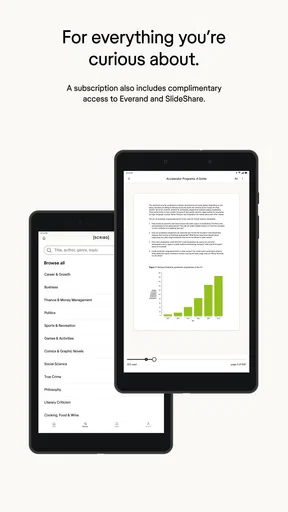
The strongest case for Scribd is variety. I can see the appeal of keeping books, audiobooks, magazines, sheet music, and reference documents within one reading-oriented app instead of switching between several specialized services. It is especially useful when my interests cross categories—for example, when I want a book for leisure, a document for a project, and a magazine to browse during the same week.
That breadth also changes how I would search. Rather than treating the app as a shop for one known title, I’d use it to investigate a topic, then look across the kinds of material that might help: a practical document for immediate detail, a longer work for background, or audio when reading on a screen isn’t convenient. That approach makes the collection feel more like a research shelf than a single-purpose ebook reader.
Trade-offs to keep in mind
A large catalog is not the same as a guaranteed match. If I need one particular title for a class, work task, or book club, I’d search for that title before paying for access. If it is missing—or if the version available is not the one I need—the overall size of the library won’t solve the problem. This is the main reason I’d avoid subscribing on the strength of a headline collection figure alone.
The subscription approach may also be less attractive to someone who reads only occasionally or prefers to own individual books. A person who wants a permanent personal library, a specific publisher’s catalog, or a specialist reference source may be better served by buying titles individually or using a focused service. In my view, Scribd makes more sense when I expect to explore and use multiple kinds of material, not when I’m simply looking for one book at the lowest possible cost.
I’d also keep expectations measured around discovery. Recommendations and curated collections can help me find something when I don’t know what to choose, but they shouldn’t replace checking the exact title or format I have in mind. For research, I’d verify that a document is suitable for my purpose rather than treating its presence in a broad collection as proof that it is authoritative or up to date.
Who is likely to get the most out of it?
I’d recommend considering Scribd if you read regularly, enjoy audiobooks as well as ebooks, or often move between leisure reading and reference material. It may also suit curious readers who like browsing by topic and are happy to discover something unexpected instead of arriving with a strict reading list. The Android app has 5 million or more installs, suggesting it has reached a substantial audience, but the right fit still comes down to your own habits.
By contrast, I’d skip it if I only need occasional access to one book, if I rely on a particular title that I haven’t checked in the catalog, or if I prefer paying once and keeping a copy. It is also not the first place I’d turn for a narrow professional database or a carefully curated academic collection: a specialist reference service or a library catalog may be a better starting point for that kind of work.
A realistic way I’d use it
Imagine I have a train ride ahead, a project to prepare, and no clear idea what to read afterward. I could first search for the exact reference material I need, then save suitable reading for offline use before leaving reliable internet. During the ride, I could switch from a document to an audiobook or magazine, and later return to my reading rather than juggling separate apps. The practical tip is to confirm access and download what I need while connected; that avoids making an important trip depend on finding a signal at the last moment.
I’d use a similarly deliberate routine for recommendations. After reading or listening to something I genuinely liked, I’d explore related suggestions and curated collections, but I’d treat them as leads rather than guarantees. For a topic where accuracy matters, I’d compare what I find with a trusted source. For entertainment, I’d be more relaxed and let the recommendations guide a bit of browsing.
Compared with a standard ebook store, Scribd’s appeal is less about buying a single chosen title and more about having different kinds of reading material together. Compared with a free public library app, the decision is about whether Scribd’s particular catalog and access model fit better than borrowing from a local library. Neither alternative is automatically superior: a store can suit ownership, a library can suit borrowing, and Scribd can suit varied, frequent use—provided its current terms and available titles work for me.
Reading experience and everyday friction
In day-to-day use, I’d pay attention to how well the app supports the way I actually read, not just how many categories it presents. Font size and background adjustments can make longer reading sessions more comfortable, while syncing is useful if I move between a phone, tablet, or computer. I’d still check that my place has carried over before settling in, especially when switching devices in the middle of a book.
Offline access is valuable, but it rewards a little preparation. I’d download a book or document before commuting, traveling, or entering a place with unreliable connectivity, then open it once to make sure it is ready. This is a small habit, but it makes the difference between a useful offline library and discovering too late that the material I wanted is not available on the device at that moment.
There is also a trade-off in having so many kinds of content together. A single app can reduce switching, but a large mixed collection may take more effort to browse than a focused bookstore or a dedicated audiobook app. When I know exactly what I want, direct search is likely to be more efficient than wandering through recommendations. When I am undecided, browsing is part of the value.
Questions I would settle before paying
Can I use it without paying? I can download the app for free, but I would check which content and functions are available to me before making that assumption about ongoing use. Is a particular title included? I would search for it directly and confirm the format, rather than relying on the size of the overall collection. Do I need internet? I’d plan to download chosen material before going offline, then test access on my device.
Would it replace buying books or using a library? For me, not in every case. If I want to keep a specific book, ownership may be the clearer choice; if borrowing is enough and my local library offers the title, its app may be preferable. Scribd is most compelling when I’ll use enough of its varied collection to justify the current paid terms. As the app runs at version 16.3 and supports Android 7.1 or later, I’d also check compatibility on an older device before relying on it.
My verdict on the value
I see Scribd as a potentially worthwhile reading hub, not a guaranteed bargain for everyone. Its mix of formats can be genuinely convenient, particularly for readers who alternate between books, audio, magazines, and practical documents. But the choice to pay should follow a quick check of the current terms and the titles I care about—not an assumption that a broad catalog automatically equals personal value.
For a frequent reader who likes exploring across formats, I’d give it a try and judge it by how often I return to material I actually want. For an occasional reader, someone focused on one title, or anyone who values ownership above variety, I’d compare it with buying that book or borrowing it first. That is the honest dividing line for me: pay for the range only when the range fits your real reading habits.
Ever found yourself wishing for a massive library right in your pocket? Well, let me introduce you to Scribd, the app that’s basically a reader’s paradise with over 300 million documents. I’ve spent some quality time exploring its nooks and crannies, and I’m here to spill the beans on what makes this app tick.
The Treasure Trove of Content
When it comes to content, Scribd is like that all-you-can-eat buffet, but for books, audiobooks, and more. You get access to an enormous collection of ebooks, audiobooks, magazines, and even sheet music. It’s like walking into a library that never closes. Whether you're a fan of bestsellers or niche genres, this app has you covered.
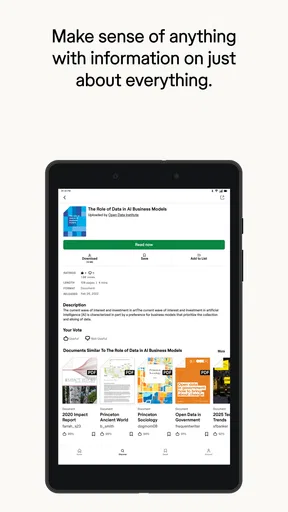
What I love about the content variety is that it’s not just limited to books. The audiobooks section is particularly impressive, with narrations that bring stories to life. Plus, the inclusion of magazines means you can keep up with your favorite publications on-the-go. And let's not forget the documents—ranging from academic papers to business presentations. It’s a smorgasbord of information.
Interface and User Experience
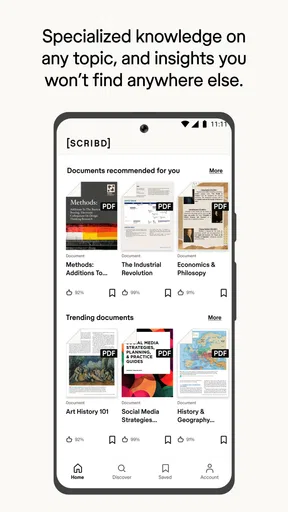
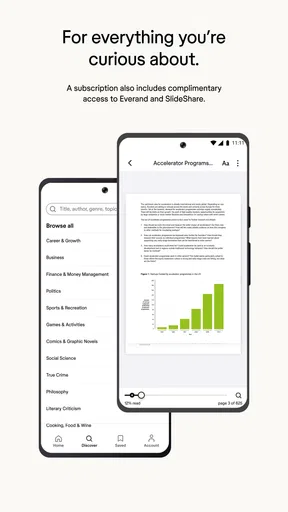
The interface is sleek and intuitive, which makes diving into your next read a breeze. Navigating through Scribd is as smooth as butter, with a clean design that doesn’t overwhelm. You can easily search for titles, authors, or genres, and the app’s recommendations are spot-on, often introducing me to new authors I wouldn’t have stumbled upon otherwise.
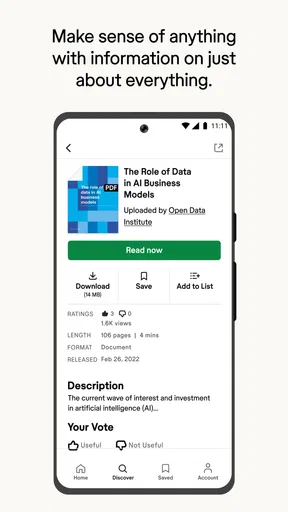
One of the things I appreciate is the offline mode. You can download content to enjoy without internet access, which is perfect for long flights or remote getaways. The syncing feature ensures that you can pick up where you left off, whether you’re on your phone, tablet, or even your computer.
Personalization and Recommendations
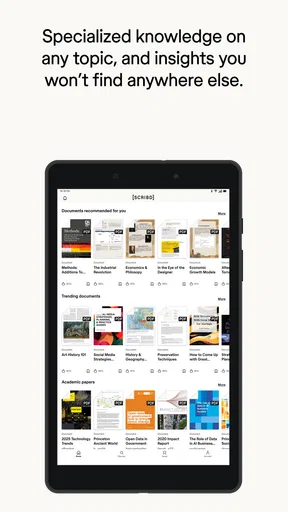
Scribd’s recommendation engine is like having a personal librarian who knows your taste. The more you read, the better the suggestions get. It’s pretty spot-on with identifying what I might like based on my reading history. Plus, the app allows you to customize your reading settings, from font size to background color, making it easy to tailor the experience to your preferences.
I also have to mention the curated lists and collections. They’re a fantastic way to discover new content, especially if you’re in the mood for something specific but don’t know exactly what. Whether it’s a list of the latest thrillers or a collection of classic literature, there’s always something new to explore.
Subscription and Cost
Now, let’s talk subscriptions. Scribd operates on a subscription model, which means you pay a monthly fee for unlimited access. It’s like Netflix, but for readers. While some may find the subscription fee a bit steep, I think it’s a fair trade-off considering the vast amount of content you get. Plus, there’s a free trial for new users, so you can dip your toes in before diving in fully.
One neat perk is the ability to share your account with family members, allowing them to enjoy the vast library without any additional cost. It’s a great way to get everyone in on the reading action.
Conclusion: A Bibliophile's Dream
All in all, Scribd is a dream come true for anyone who loves to read. It’s comprehensive, user-friendly, and packed with content to keep you entertained for hours. Whether you’re a voracious reader or just someone who enjoys a good book now and then, this app is definitely worth checking out.
So, if you’re itching for a new read or just want to explore the world of audiobooks and magazines, give Scribd a whirl. It’s like carrying an entire library in your pocket. Who wouldn’t want that?
Verdict
Strengths of Scribd: 300M+ documents
- Extensive library of books and documents.
- User-friendly interface for easy navigation.
- Offline access to downloaded content.
- Cross-platform syncing for seamless use.
- Customizable reading settings.
Limitations of Scribd: 300M+ documents
- Subscription required for full access.
- Limited audiobook selection.
- Occasional app performance issues.
- Content availability varies by region.
- No option for permanent content download.
Other Releases by Scribd, Inc.
View All
Everand: Audiobooks & Ebooks
Books & Reference3.5

Fable: Track & Discuss Books
Books & Reference4.7
Similar Picks in This Category
View All
Google Play Books & Audiobooks
Google LLC4.7

네이버 - NAVER
NAVER Corp.3.5

Wattpad - Read & Write Stories
Wattpad.com3.7

King James Bible - Verse+Audio
Ozion4.8

Bible Offline-KJV Holy Bible
Bíblia Offline4.9

Amazon Kindle: Reading App
Amazon Mobile LLC4.8
Frequently Asked Questions
What is Scribd and how does it work?
Scribd is a digital library offering access to millions of e-books, audiobooks, magazines, and more. Users can explore various genres and topics by subscribing to the service. The app provides personalized recommendations based on your reading habits and allows offline access to content, making it a versatile choice for avid readers.
Is Scribd available on both Android and iOS devices?
Yes, Scribd is available for download on both Android and iOS platforms. You can easily find the app on the Google Play Store for Android devices and the Apple App Store for iOS devices, ensuring a seamless experience across different mobile devices.
Does Scribd offer a free trial, and what are the subscription costs?
Scribd offers a free trial period, typically 30 days, allowing users to explore its vast library before committing to a subscription. After the trial, a monthly subscription fee applies, which grants unlimited access to its content. It's advisable to check their website or app for the latest pricing details.
Can I download books and read them offline on Scribd?
Yes, Scribd allows you to download books, audiobooks, and other documents for offline reading. This feature is ideal for users who wish to enjoy content without relying on an internet connection, making it convenient for travel or areas with limited connectivity.
What types of content are available on Scribd besides books?
In addition to a vast collection of e-books, Scribd also offers audiobooks, magazines, podcasts, sheet music, and documents. This wide range of content caters to different interests and preferences, ensuring there is something for everyone to enjoy on the platform.
